# Create & Update an Advocate Profile

When you first sign up for Advocate you'll use our Create Account form to enter some basic info.

If you were in a hurry or missed something, you can review and update your Profile information. From your Dashboard, click on My Profile ->

<figure><img src="https://563043647-files.gitbook.io/~/files/v0/b/gitbook-x-prod.appspot.com/o/spaces%2F2KKP1TyA7HGgvucTAPcV%2Fuploads%2Fav1CcLhnNqGV4O8Bycbf%2Fimage.png?alt=media&#x26;token=b09c5440-fd92-495d-a990-8d5a5d48da72" alt=""><figcaption><p>Click on the button that says My Profile to find your Profile info. </p></figcaption></figure>

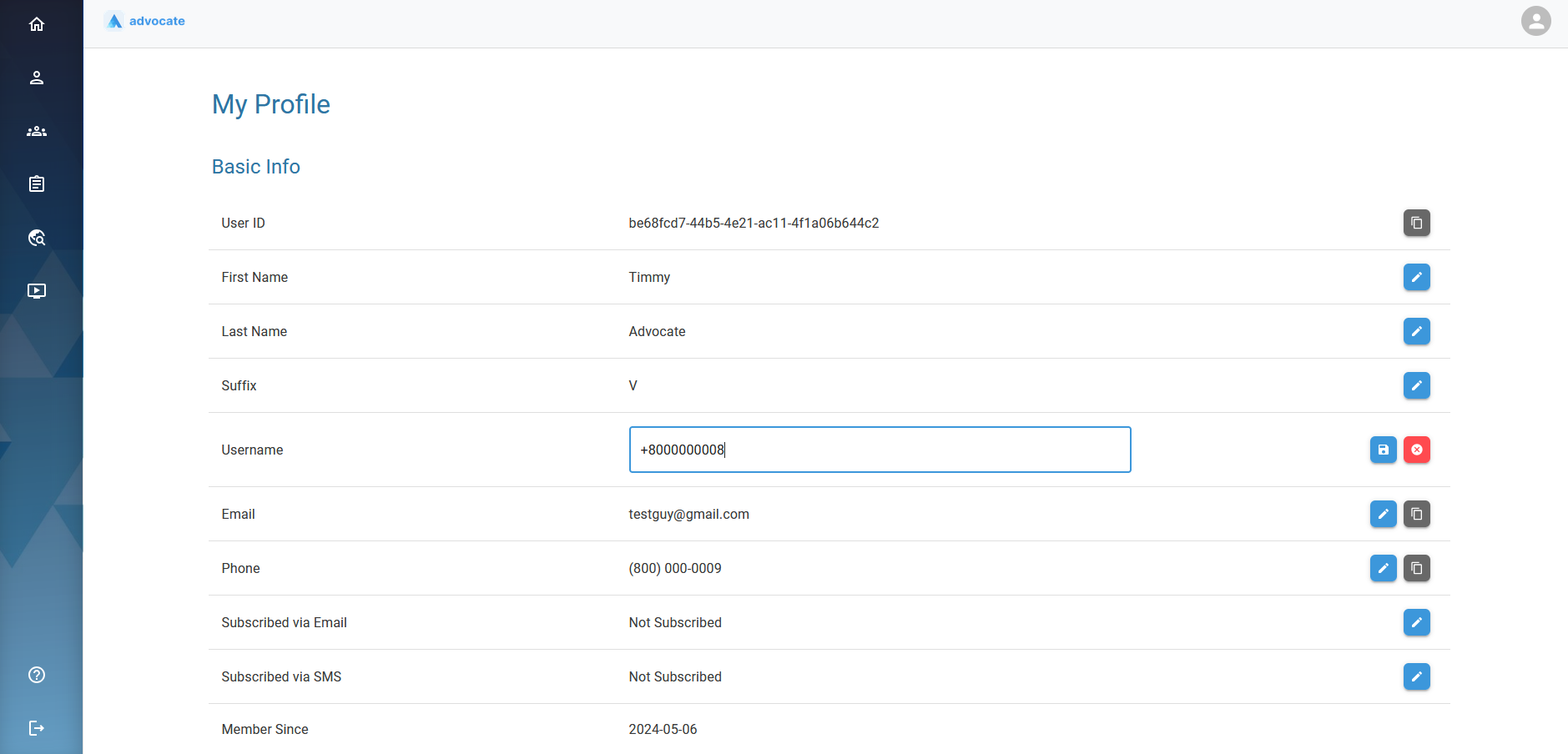
You may view & update your Profile details. Just click the blue pencil icon to edit a field ->

<figure><img src="https://563043647-files.gitbook.io/~/files/v0/b/gitbook-x-prod.appspot.com/o/spaces%2F2KKP1TyA7HGgvucTAPcV%2Fuploads%2FtcXMYSIyq7v1enZakZXj%2Fimage.png?alt=media&#x26;token=fcf778e7-bbae-4523-bb6c-0a1b35a57c7a" alt=""><figcaption><p>The name, phone number and email are all fictional for Timmy Advocate V</p></figcaption></figure>

Once you are done, you can always cancel changes by clicking the red x or save changes using the blue disk icon.&#x20;

<figure><img src="https://563043647-files.gitbook.io/~/files/v0/b/gitbook-x-prod.appspot.com/o/spaces%2F2KKP1TyA7HGgvucTAPcV%2Fuploads%2F9mTp45l7sDTM53xF0baK%2Fimage.png?alt=media&#x26;token=0de2a7c8-a700-4ba8-a5cf-3ec647050823" alt=""><figcaption><p>You can edit any field with a blue pencil icon.</p></figcaption></figure>

{% hint style="info" %}
If you scroll down to the bottom of the page you will see additional information that some programs may be interested in knowing about you to qualify you for more resources.&#x20;
{% endhint %}

{% hint style="info" %}
These fields are optional, however you may want to update them in case a Program requires this Eligibility Information.&#x20;
{% endhint %}

<figure><img src="https://563043647-files.gitbook.io/~/files/v0/b/gitbook-x-prod.appspot.com/o/spaces%2F2KKP1TyA7HGgvucTAPcV%2Fuploads%2Fcjei5n9oiWKjNadbEjlC%2Fimage.png?alt=media&#x26;token=14791125-ce73-40b5-bedf-5acb9de5b199" alt=""><figcaption><p>Optional Personal and Eligibility Info below</p></figcaption></figure>

Once you're done updating your profile you're ready to Search for and Apply for Programs. ->